
How to Get Instant Upwork Job Notifications in 2026 (3 Methods)
On Upwork, speed matters. Freelancers who apply within the first 15 minutes of a job posting are significantly more likely to get hired. But manually refreshing Upwork's job feed all day isn't realistic.
Here are three ways to get instant notifications when new Upwork jobs matching your skills are posted.
Why Job Notifications Matter on Upwork
The freelance marketplace is competitive. For popular categories, a new job can receive 20-50 proposals within the first hour. Being early gives you:
- Higher visibility: Your proposal appears near the top of the client's list
- Less competition: Fewer proposals to compete against
- Better impression: Clients often review early proposals more carefully
This is why real-time job notifications are one of the highest-ROI tools for serious Upwork freelancers.
Method 1: Upwork's Built-In Job Alerts
Upwork offers basic job alerts through their platform:
- Email alerts: Set up saved searches and Upwork will email you periodically
- Mobile push notifications: The Upwork app can notify you about new jobs
- In-app recommendations: Upwork's algorithm suggests jobs based on your profile
Limitations: Upwork's built-in alerts are not real-time — there's often a delay of 15-60 minutes. You also can't send notifications to Slack, Discord, or Telegram, and the filtering options are basic compared to dedicated tools.
Method 2: RSS Feeds (Discontinued)
Upwork previously offered RSS feeds that many freelancers used with tools like IFTTT or Zapier to create custom notification workflows. However, Upwork officially discontinued RSS feeds in 2024, citing concerns about automated bidding.
If you relied on RSS feeds, you'll need to switch to a dedicated job monitoring tool (see Method 3).
Method 3: Dedicated Job Monitoring Tools
The most effective way to get instant Upwork job notifications is through a dedicated monitoring tool. These tools continuously scan Upwork for new jobs matching your criteria and deliver notifications in real-time.
Vollna — Real-Time Upwork Job Monitoring
Vollna is built specifically for Upwork freelancers and agencies. It fills the gap left by discontinued RSS feeds and goes far beyond what Upwork's native alerts offer.
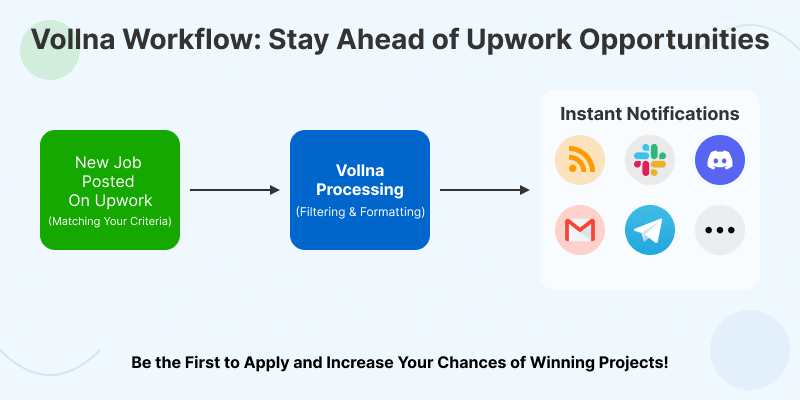
Vollna's workflow — from job posting to notification delivery
Notification Channels
Vollna delivers job alerts through the channels you already use:
- Slack — Get notifications in a dedicated channel
- Discord — Perfect for freelancers who live in Discord
- Telegram — Instant mobile notifications
- Email — Digest or real-time alerts
- Webhooks — Connect to any tool via custom webhooks
- CRM integrations — Pipedrive, HubSpot, Monday, ClickUp, and more
How It Works
- Set up your job search criteria — keywords, categories, budget range, client history, and more
- Choose your notification channel(s)
- Vollna monitors Upwork continuously and alerts you when matching jobs appear
- Review the job details and apply directly from your notification
Key Benefits
- Speed: Notifications arrive within minutes of a job being posted
- Advanced filtering: Filter by budget, client rating, job type, location, and dozens of other criteria
- AI job qualification: AI scores each job's fit for your profile so you don't waste Connects
- Multiple channels: Get alerts wherever you work — not just in your email inbox
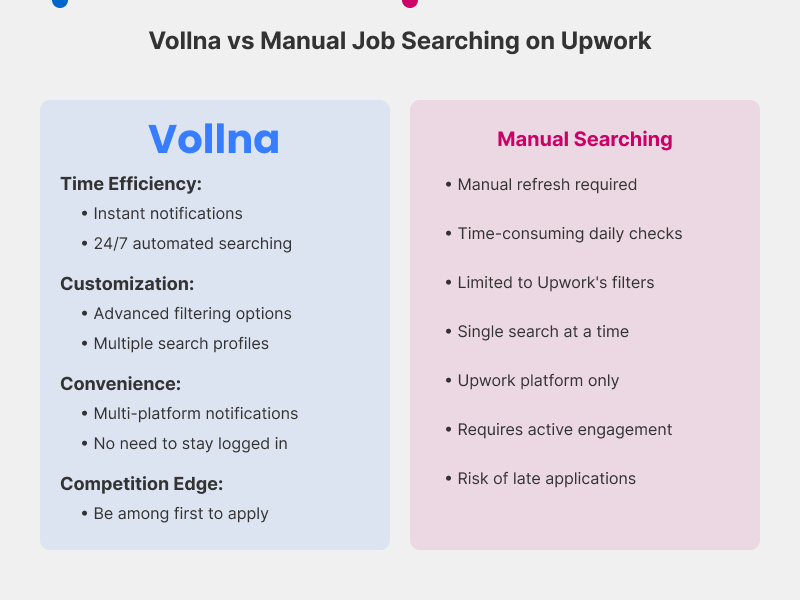
Vollna vs. manual job searching comparison
Comparison: Upwork Alerts vs. Vollna
| Feature | Upwork Built-In | Vollna |
|---|---|---|
| Notification speed | 15-60 min delay | Near real-time |
| Slack/Discord/Telegram | No | Yes |
| Advanced filters | Basic | 30+ filter fields |
| AI job scoring | No | Yes |
| CRM integration | No | Yes |
| Webhook support | No | Yes |
| Price | Free | Free 14-day trial |
Getting Started
Vollna offers a 14-day free trial with no credit card required:
- Sign up for free
- Set up your job search criteria and choose your notification preferences
- Start receiving real-time alerts about new Upwork jobs
While you're at it, check your profile with our free Upwork Profile Analyzer to make sure you're ready to impress clients when you apply.
Summary
Upwork's built-in alerts are a starting point, but they're too slow and limited for competitive freelancers. With RSS feeds discontinued, dedicated tools like Vollna are the best way to get instant job notifications and be first to apply.
The math is simple: faster notifications = earlier proposals = more wins.