> ## Documentation Index
> Fetch the complete documentation index at: https://www.vollna.com/docs/llms.txt
> Use this file to discover all available pages before exploring further.
# How to access RSS Feed
> RSS Feed allows you to get a list of projects in XML format and use with your favorite RSS reader.
Unlike Upwork, Vollna keep support RSS Feeds for all platforms.
RSS avaialble for all filters.
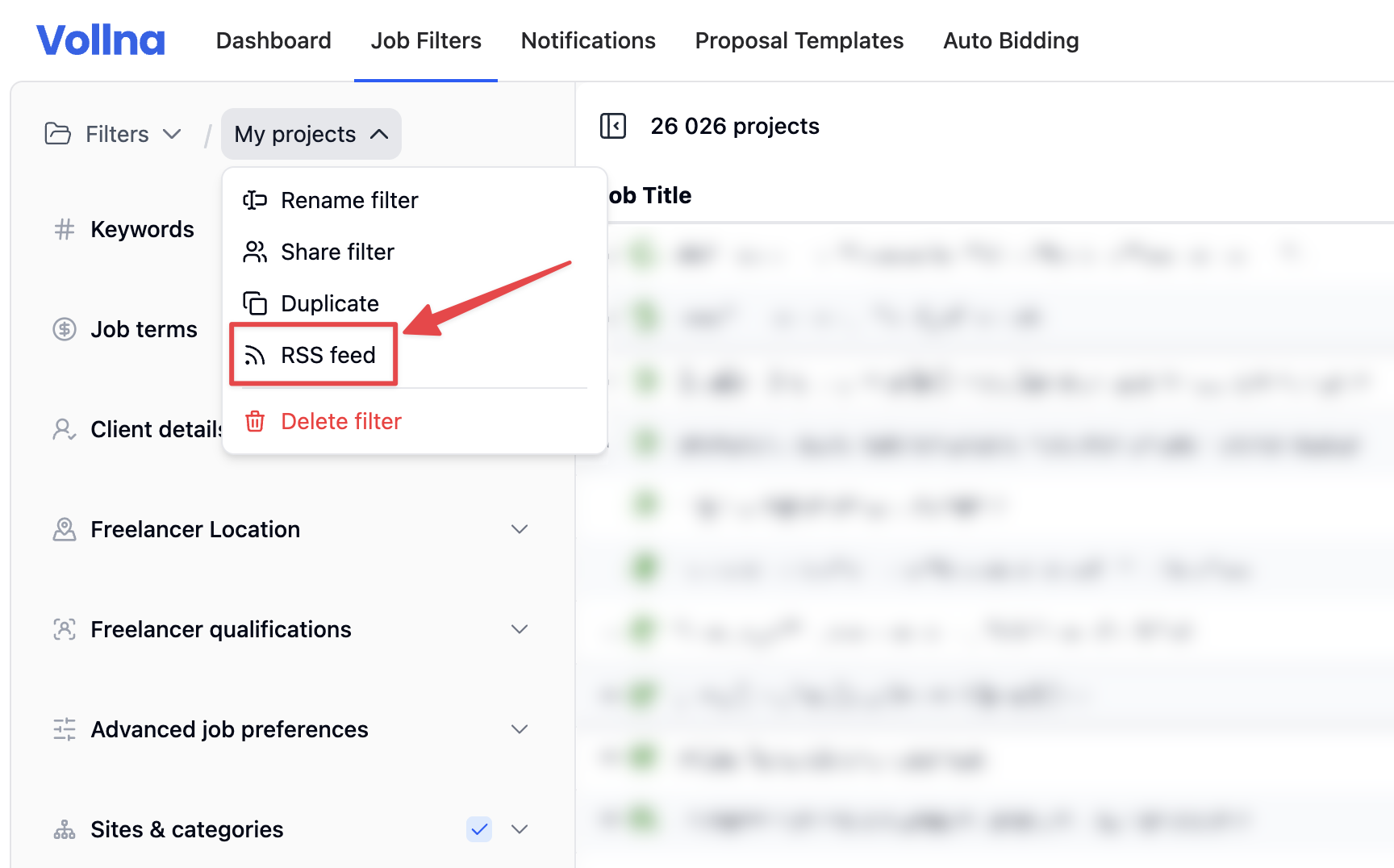
To access it go to the filter page, click on the filter name, and in the dropdown select the *RSS feed* option.
 By default, RSS feed returns 30 projects with 10 minutes cache.
You can change the number of projects and cache time in the settings by add parameters to the RSS URL.
Number of projects to return. Default is 30.
Minimum is 10.
Maximum is 200.
Cache time in seconds.
Default is 600 seconds (10 minutes).
Minimum is 180 seconds.
Maximum is 3600 seconds.
By default, RSS feed returns 30 projects with 10 minutes cache.
You can change the number of projects and cache time in the settings by add parameters to the RSS URL.
Number of projects to return. Default is 30.
Minimum is 10.
Maximum is 200.
Cache time in seconds.
Default is 600 seconds (10 minutes).
Minimum is 180 seconds.
Maximum is 3600 seconds.