> ## Documentation Index
> Fetch the complete documentation index at: https://www.vollna.com/docs/llms.txt
> Use this file to discover all available pages before exploring further.
# AI Job Qualifier
> Let AI read every matching job and mark it qualified or disqualified before you spend a connect.
The AI Job Qualifier reads the whole job post and decides whether it fits the rules you wrote. Each job gets a verdict, **Qualified** or **Disqualified**, with a one-line reason.
A qualifier is a prompt plus a model. It lives in one of three places:
* On a filter. It checks the jobs that filter finds.
* On an auto-bidding setup. It decides which jobs get a proposal. See [Create a setup](/docs/auto-bidding/setup).
* Saved on its own under **Settings**, then **AI Job Qualifiers**, where one prompt can serve several filters and setups.
Every run spends AI Qualifier credits. See [AI Credits & Limits](/docs/ai-credits).
## Turn it on for a filter
1. Open the filter and click **AI Job Qualifier**.
2. Write the rules in **Prompt**. Click **Examples** for three starting points: **Comprehensive filter**, **Skills & relevance filter**, **Budget & client quality**.
3. Click **Save**.
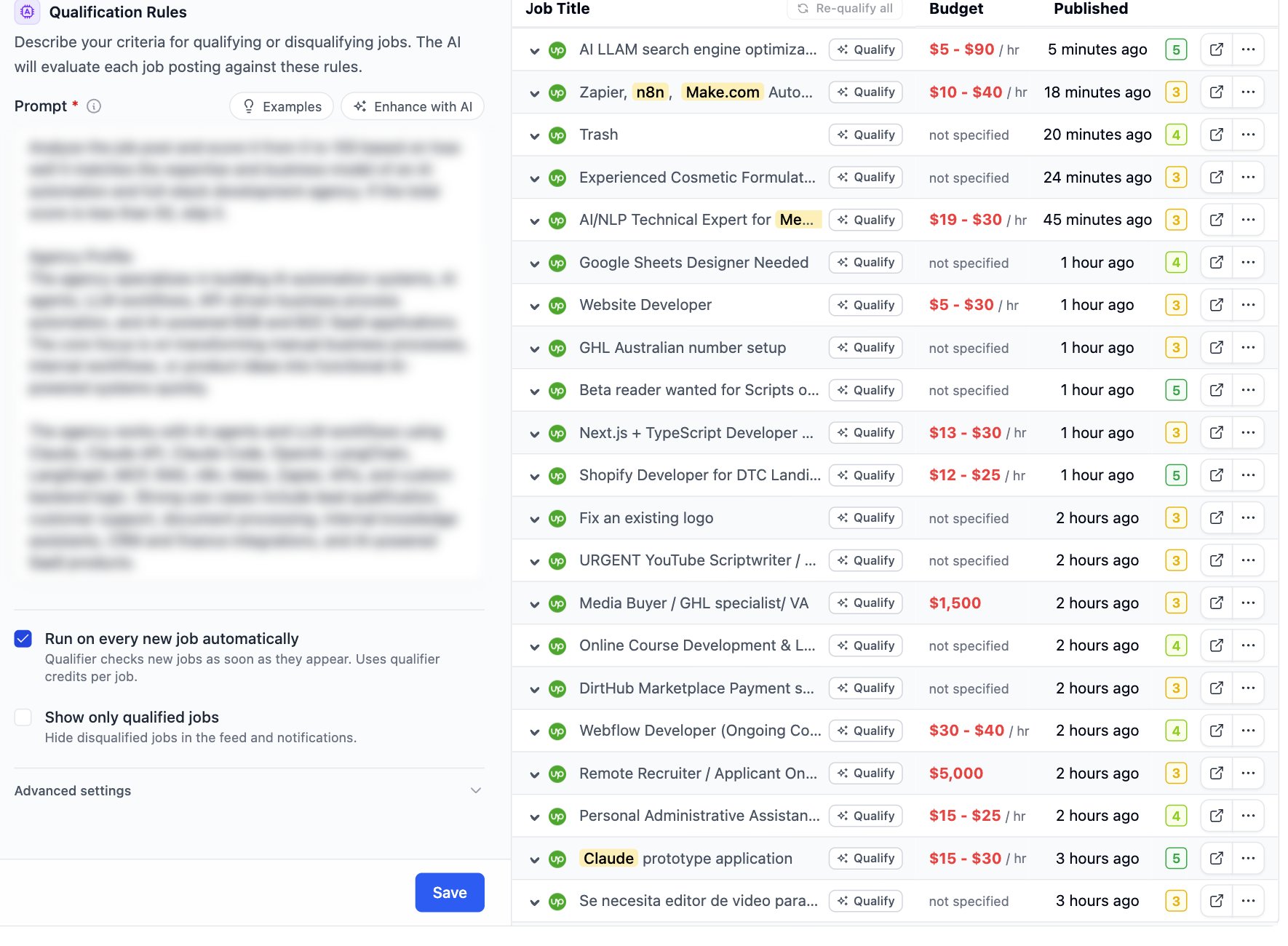 Two options sit under the prompt.
| Option | What it does |
| -------------------------------------- | ---------------------------------------------------------------------------------------------------------------------------------------- |
| **Run on every new job automatically** | The qualifier checks each new job as soon as it appears. Every job costs credits. Leave it off to qualify jobs one by one from the feed. |
| **Show only qualified jobs** | Hides disqualified jobs from the feed and from notifications. |
Open **Advanced settings** to pick the **Model**. The default model costs one credit per job. Others cost more.
The status chip at the top disables and enables the qualifier. A disabled qualifier keeps its prompt.
## Read the verdict in the feed
Each job in the feed carries a **Qualified** or **Disqualified** pill. Hover it to read the reason.
Two options sit under the prompt.
| Option | What it does |
| -------------------------------------- | ---------------------------------------------------------------------------------------------------------------------------------------- |
| **Run on every new job automatically** | The qualifier checks each new job as soon as it appears. Every job costs credits. Leave it off to qualify jobs one by one from the feed. |
| **Show only qualified jobs** | Hides disqualified jobs from the feed and from notifications. |
Open **Advanced settings** to pick the **Model**. The default model costs one credit per job. Others cost more.
The status chip at the top disables and enables the qualifier. A disabled qualifier keeps its prompt.
## Read the verdict in the feed
Each job in the feed carries a **Qualified** or **Disqualified** pill. Hover it to read the reason.
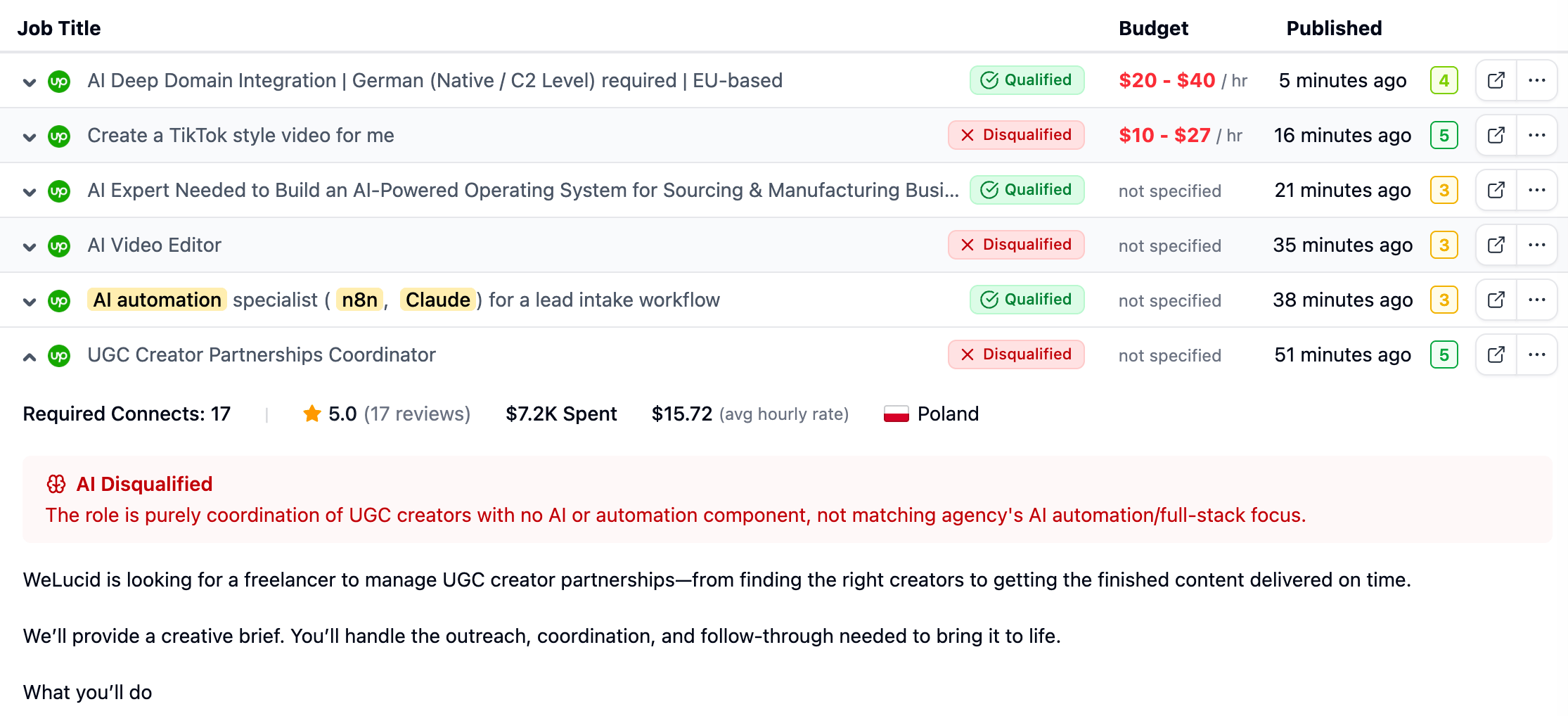 Hover a job without a verdict and click the brain icon, **Run AI Job Qualifier**, to check that job now. When the qualifier is off for the filter, the pill still shows the last saved verdict.
The filter's **AI Job Qualifier** page shows the same jobs in a table next to the prompt, with a **Qualify** button per job and the tabs **All**, **Qualified** and **Disqualified**. Click **Re-qualify all** above the table to run the current prompt on those jobs again. Use it after you change the prompt.
## Write a prompt that works
Write rules, not a description of your agency. The model needs to know what to accept and what to reject.
* Name the work you take. Name the work you refuse.
* Add hard limits: minimum budget, client history, location, language.
* Give a threshold when you score. "Score 0 to 100. Below 60, disqualify."
* Keep one idea per line.
Click **Enhance with AI** to have the model rewrite your draft into that shape. It asks before replacing the current prompt. The counter under the box shows the characters left.
## When credits run out
The pill reads **Low credits** and no new jobs are checked. Jobs already checked keep their verdict. Auto-bidding setups that rely on the qualifier stop qualifying new jobs until the credits reset or you buy extra credits. See [AI Credits & Limits](/docs/ai-credits).
## Messages
| Message | What to do |
| --------------------------------- | ------------------------------------------------------- |
| Prompt is required | Write a prompt before saving |
| Prompt must be under N characters | Shorten the prompt to the length the counter shows |
| Not enough credits | Buy extra credits or wait for the reset |
| Qualification failed | Run the job again. If it repeats, try the default model |
| Couldn't enhance the prompt. | Try **Enhance with AI** again in a minute |
Hover a job without a verdict and click the brain icon, **Run AI Job Qualifier**, to check that job now. When the qualifier is off for the filter, the pill still shows the last saved verdict.
The filter's **AI Job Qualifier** page shows the same jobs in a table next to the prompt, with a **Qualify** button per job and the tabs **All**, **Qualified** and **Disqualified**. Click **Re-qualify all** above the table to run the current prompt on those jobs again. Use it after you change the prompt.
## Write a prompt that works
Write rules, not a description of your agency. The model needs to know what to accept and what to reject.
* Name the work you take. Name the work you refuse.
* Add hard limits: minimum budget, client history, location, language.
* Give a threshold when you score. "Score 0 to 100. Below 60, disqualify."
* Keep one idea per line.
Click **Enhance with AI** to have the model rewrite your draft into that shape. It asks before replacing the current prompt. The counter under the box shows the characters left.
## When credits run out
The pill reads **Low credits** and no new jobs are checked. Jobs already checked keep their verdict. Auto-bidding setups that rely on the qualifier stop qualifying new jobs until the credits reset or you buy extra credits. See [AI Credits & Limits](/docs/ai-credits).
## Messages
| Message | What to do |
| --------------------------------- | ------------------------------------------------------- |
| Prompt is required | Write a prompt before saving |
| Prompt must be under N characters | Shorten the prompt to the length the counter shows |
| Not enough credits | Buy extra credits or wait for the reset |
| Qualification failed | Run the job again. If it repeats, try the default model |
| Couldn't enhance the prompt. | Try **Enhance with AI** again in a minute |