> ## Documentation Index
> Fetch the complete documentation index at: https://www.vollna.com/docs/llms.txt
> Use this file to discover all available pages before exploring further.
# Auto Top-Up Connects
> Automatically buy more Upwork Connects when Auto-Bidding runs low.
Auto Top-Up buys more Connects on Upwork when your agency's balance runs low, so bidding does not stop. It never spends more than the limits you set.
It works once your agency is approved for Auto-Bidding and a setup is connected to your Business Manager.
## Set the limits
On the [Auto-Bidding settings page](https://www.vollna.com/dashboard/auto-bidding/settings), turn on **Auto top-up Connects**.
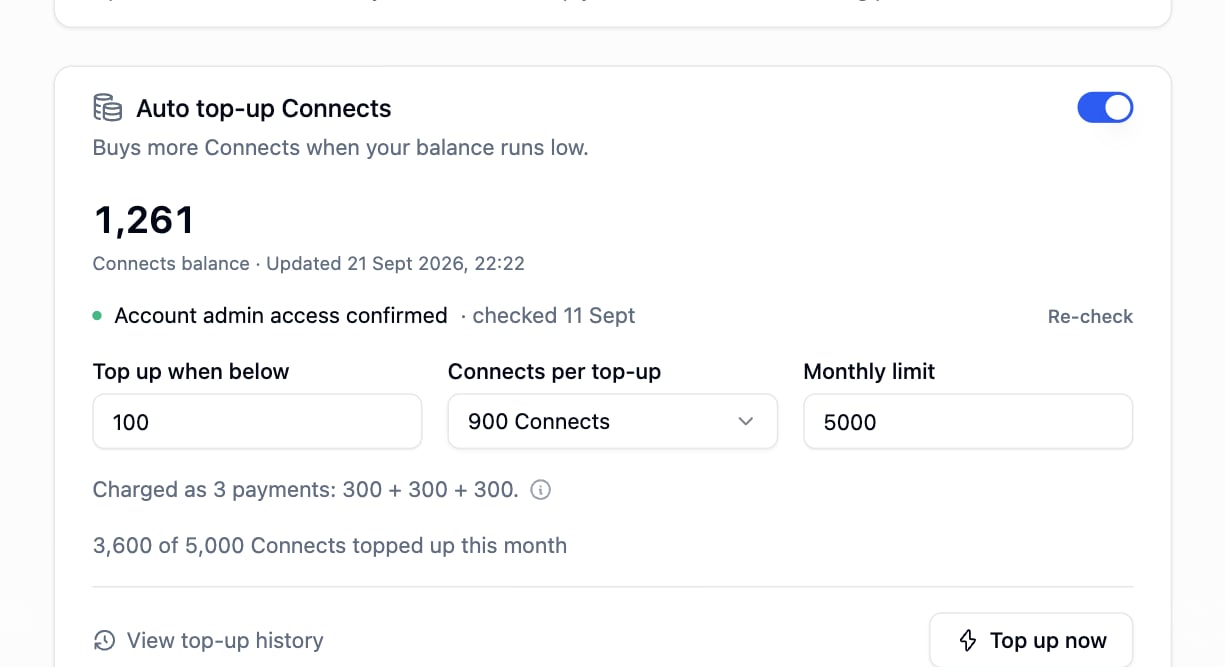 | Field | What to enter |
| ----------------------- | ---------------------------------------------------------------------------------------- |
| **Top up when below** | The balance that triggers a purchase, 100 to 5000 |
| **Connects per top-up** | 150 to 900, in steps of 150 |
| **Monthly limit** | Total Connects per calendar month, 150 to 50000, and never below **Connects per top-up** |
Upwork sells 150 and 300 bundles, so a larger amount runs as several payments one after another. If one payment fails, the rest are skipped.
Vollna runs one purchase at a time and spaces automatic purchases several hours apart, so a slow or failed purchase cannot repeat.
**Top up now** buys the configured amount right away, within the monthly limit. It needs saved settings.
## Grant Upwork access
The Business Manager profile on your Upwork account needs the **Account admin** role to buy Connects. Without it, every top-up fails.
1. On Upwork, open **Settings** > **Teams & Members** > **Members**.
2. Find the Business Manager profile and click its three-dots menu > **View user details**.
3. In the row with your team name, click the three-dots menu > **Edit member roles**.
4. Enable **Account admin** and save.
Upwork moves these menus from time to time. Look for the screen that sets member roles.
**Check access** confirms the role is set without buying anything. The result stays on the page with the date of the check.
## Billing
Purchases are charged to your agency's primary Upwork billing method. After a failed charge, automatic top-ups pause for six hours. Fix the billing method on Upwork, then wait or click **Top up now**.
| Field | What to enter |
| ----------------------- | ---------------------------------------------------------------------------------------- |
| **Top up when below** | The balance that triggers a purchase, 100 to 5000 |
| **Connects per top-up** | 150 to 900, in steps of 150 |
| **Monthly limit** | Total Connects per calendar month, 150 to 50000, and never below **Connects per top-up** |
Upwork sells 150 and 300 bundles, so a larger amount runs as several payments one after another. If one payment fails, the rest are skipped.
Vollna runs one purchase at a time and spaces automatic purchases several hours apart, so a slow or failed purchase cannot repeat.
**Top up now** buys the configured amount right away, within the monthly limit. It needs saved settings.
## Grant Upwork access
The Business Manager profile on your Upwork account needs the **Account admin** role to buy Connects. Without it, every top-up fails.
1. On Upwork, open **Settings** > **Teams & Members** > **Members**.
2. Find the Business Manager profile and click its three-dots menu > **View user details**.
3. In the row with your team name, click the three-dots menu > **Edit member roles**.
4. Enable **Account admin** and save.
Upwork moves these menus from time to time. Look for the screen that sets member roles.
**Check access** confirms the role is set without buying anything. The result stays on the page with the date of the check.
## Billing
Purchases are charged to your agency's primary Upwork billing method. After a failed charge, automatic top-ups pause for six hours. Fix the billing method on Upwork, then wait or click **Top up now**.